

Guides
How to Keep a Watchlist You Actually Watch
How to keep a watchlist you actually use: prune it, sort it by mood and length, and turn it into one concrete pick for tonight.
Most watchlists fail for the same reason: they are built for adding, not for choosing. This guide covers how to keep a watchlist that still answers a question at the end of the day, including how to split it into two lists, what to record when you add a title, and how to prune it so the shortlist stays readable.
Why Most Watchlists Stop Working
A watchlist starts as a memory aid. A friend mentions a show, you add it, and the list does its job. The failure happens later, once the list is long enough that scanning it costs more effort than opening a streaming home screen and taking whatever is on top.
Past a certain size, a list stops being a set of candidates and becomes an archive. Both are useful, but they do different jobs, and a single undifferentiated list cannot do either one well. The fix is structural rather than disciplinary: you do not need to want things more, you need a smaller set of things to look at.
Decide What a Watchlist Is For
Split what you have into two lists with different rules.
The shortlist is what you intend to watch in the near future. It is short by design, and everything on it should survive the question “would I start this tonight if the mood matched?”
The archive is everything else: the acclaimed film you will get to eventually, the series someone recommended two years ago, the thing you added because of one good trailer. The archive has no size limit and no guilt attached. Its only job is to stop you from losing titles.
In ScreenAtlas, watchlist is one of four statuses alongside watching, completed and dropped. The watchlist status works as the archive, and custom lists let you keep a separate shortlist that you actually browse. If you are setting up a system from scratch, the guide on how to track every TV show and movie you watch covers the statuses in more detail.
Add Titles With a Reason Attached
When you add something, record why. A title alone tells future you almost nothing: six months later, “Severance” and “that French thing” look equally like homework.
Three things worth capturing:
- Who or what sent you there. A recommendation from a friend whose taste matches yours is a stronger signal than a trending row.
- The mood it fits. Grim and slow, funny and light, tense, comforting. This is the field you will filter on most.
- The size of the commitment. A 95 minute film and a six season drama are not comparable choices, and knowing which is which saves you a search later.
A custom list named for the mood does most of this work on its own. “Easy nights”, “Worth the effort”, “Films under two hours” are better organizing units than one list called Watchlist.
Keep the Shortlist Small Enough to Read
Pick a cap and hold it. Fifteen to twenty titles is a reasonable range: enough variety to cover different evenings, short enough to read top to bottom in under a minute.
The rule that keeps the cap honest: adding a title to the shortlist means something else leaves it. The demoted title goes back to the archive, not to the bin. This forces a comparison at the moment you are most informed, right when you have just heard why the new thing is good.
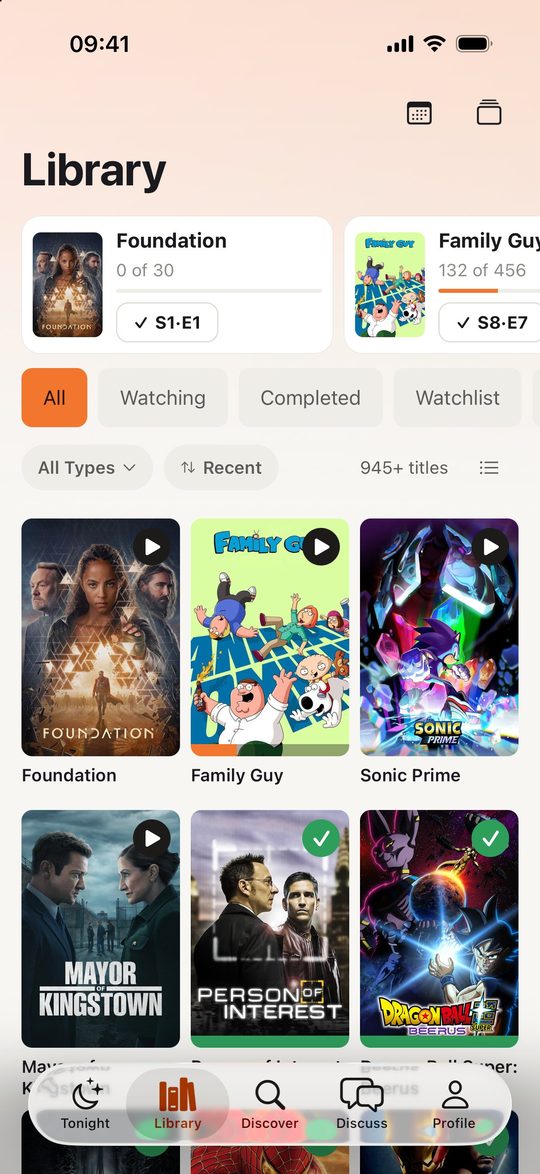
A library view with status filters makes the comparison easy. In ScreenAtlas, the Library screen filters by All, Watching, Completed and Watchlist, and shows in-progress shows with episode check buttons at the top, so you can see what is already underway before you add a fourth parallel series.
Sort by Mood, Length and Commitment
Group the shortlist into three buckets based on what the evening can hold:
- Forty-five minutes or less. A single episode of something you are already watching. This is the default on a tired weeknight, and the bucket that should never be empty.
- A film. One sitting, one decision, no continuity to remember. Keep at least three here so the choice does not depend on a single mood.
- Long-haul series. Something you start deliberately, usually on a weekend, knowing it will occupy the next several weeks.
The mistake is treating these as one pool. Browsing a mixed list at 10pm means weighing a 90 minute film against a 62 episode series, and the usual outcome of that comparison is picking neither.
Prune on a Schedule
Set a recurring pass, monthly or quarterly, and go through the shortlist with two questions.
Have I skipped this more than three times? Repeatedly passing over a title is information. It is not a shortlist candidate. Send it back to the archive and let it come up again when something changes.
Have I stalled on this? A show you stopped watching four months ago is not “watching”, it is dropped. Marking it dropped is not a judgment on the show, it clears the in-progress view so the shows you are actually following stay visible. If you return later, the progress is still there.
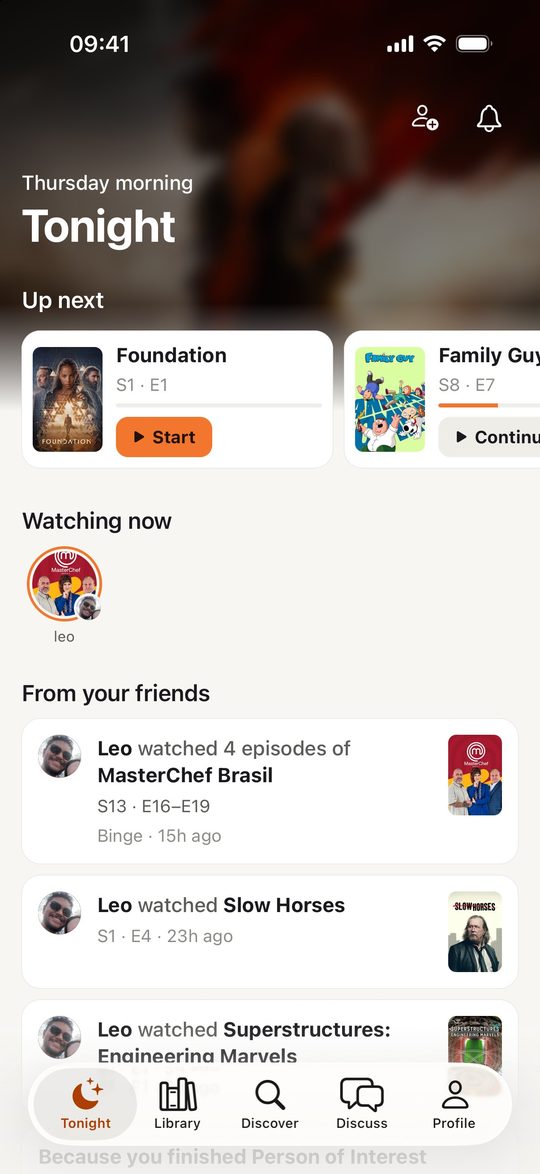
The ScreenAtlas Tonight screen is the test of whether the pruning worked. It opens on Up next cards with Continue buttons, a Watching now row and a feed of recent episodes from people you follow. When the in-progress list is accurate, the first card is usually the right answer.
Turn the List Into Tonight’s Pick
Work in one direction: time available, then mood, then title. Decide how long you have before you look at anything. Pick the bucket that fits. Then take the first title in that bucket that matches your mood, and start it.
The last step matters more than it sounds. The point of filtering is to stop comparing. Once the bucket has two or three candidates, any of them is acceptable, and continuing to deliberate costs more than the difference between them.
When nothing appeals, that is a signal about the shortlist, not about your evening. Open the archive, promote two titles that still sound good, and demote two that do not. If the problem repeats, the shortlist has drifted from what you actually want to watch, and the method for deciding what to watch tonight is worth revisiting from the top. Either way, rebuild the shortlist before you next sit down, not while you are sitting down.
Keep reading
More from the journal

How to Track Every TV Show and Movie You Watch
A practical system for tracking every show and film you watch: why memory fails, what a good tracker needs, and the three-step setup that takes under a minute.

What to Watch Tonight: The 5-Minute Method
Stop losing your evening to the browse screen. A five-step, five-minute method for picking what to watch tonight, and actually enjoying it.
Import Your Watch History From TV Time, Trakt, Letterboxd, and Simkl
ScreenAtlas can now import your watch history from TV Time, Trakt, Letterboxd, Simkl, or a CSV, and export your library back out as JSON. Format detection is automatic, re-runs are safe, and nothing gets faked.

Every Major Streaming Service in 2026, Explained
A plain-English guide to the 2026 streaming landscape: what Netflix, HBO Max, Apple TV, Disney+, Prime Video, Hulu, Paramount+, and Peacock each do best, and how to build a stack that fits your watching.